
BlueSmart7.02 - Download
You'll be able to download in few seconds.
Publisher Description
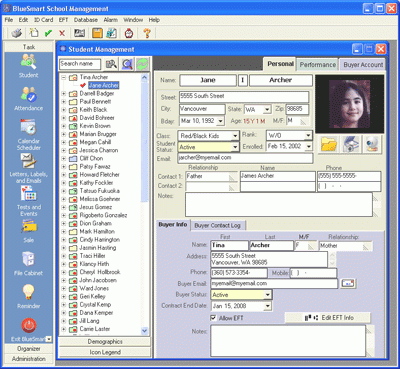
BlueSmart is hands-down the best & most affordable software for managing all types of schools, clubs and studios. Its clean interface makes it remarkably easy to use, but it offers all the tools you'll need to run your school smoothly and efficiently. Major features: student records and attendance tracking, class scheduling, staff timesheet management, test/event organization, financial report generation, form letter creation, inventory management, gradebook, custom data creation, tuition processing, in-house EFTs, file backup and much more.
BlueSmart is the ideal tool for managing all types of schools, clubs and studios including: private schools and academies, martial arts, yoga, boxing, wrestling, gymnastics, Pilates, swimming, music, dance, fitness centers, and health clubs.
The quality of BlueSmart is head and shoulders above any other school management software on the market today. This is truly one software that will boost your productivity, but won't cost you thousands of dollars to use. World-class help desk support plus hundreds of online training videos make BlueSmart unbelievably easy to learn and master. The generous licensing plans and ugrade policies are part of the package with NO hidden costs.
About BlueSmart
This Office Suites & Tools program is available in English. It was last updated on 29 September, 2026. BlueSmart is compatible with the following operating systems: Windows.
The company that develops BlueSmart is BlueSparx. The latest version released by its developer is 7.02.
The download we have available for BlueSmart has a file size of 16.8 MB. Just click the green Download button above to start the downloading process. The program is listed on our website since 2014-05-01 and was downloaded 0 times. We have already checked if the download link is safe, however for your own protection we recommend that you scan the downloaded software with your antivirus. Your antivirus may detect the BlueSmart as malware if the download link is broken.
How to install BlueSmart on your Windows device:
- Click on the Download button on our website. This will start the download from the website of the developer.
- Once the BlueSmart is downloaded click on it to start the setup process (assuming you are on a desktop computer).
- When the installation is finished you should be able to see and run the program.
Program Details
System requirements
Download information
Pricing
Version History
version 7.02
posted on 2014-05-01
Major upgrade of the interface.
Lesson planner and performance tracker features were added.
Custom data and Gradebook features were added
version 2.47
posted on 2007-10-09
Disclaimer
External Download
We do not host BlueSmart on our servers. We did not scan it for viruses, adware, spyware or other type of malware. This app is hosted by the software publisher and passed their terms and conditions to be listed there. We recommend caution when installing it.
The external download link for BlueSmart is provided to you by apps112.com without any warranties, representations or guarantees of any kind, so access it at your own risk.
If you have questions regarding this particular app contact the publisher directly. For questions about the functionalities of apps112.com contact us.
